
What is Multi‑Supplier Checkout?
Multi‑Supplier Checkout allows you to order items from multiple suppliers within a single checkout process. This saves time and helps you keep track of your purchases, even when working with several suppliers.
With Multi‑Supplier Checkout:
- All items are automatically grouped by supplier
- A separate order is automatically created in the background for each supplier
- You only need to complete the checkout once
How Multi‑Supplier-Checkout works
- Add items from one or more suppliers to your shopping cart.
- Open your Purchasing Board.
- Click “Order Cart”.
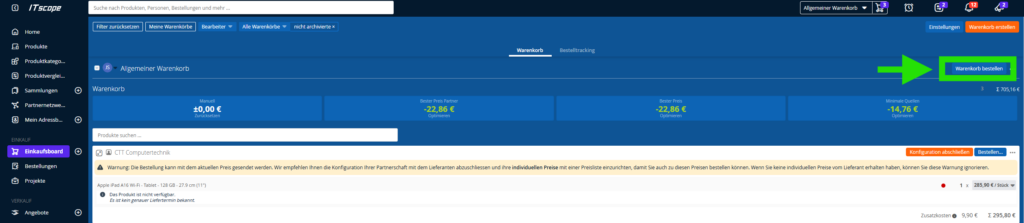
The Multi‑Supplier Checkout will then open.
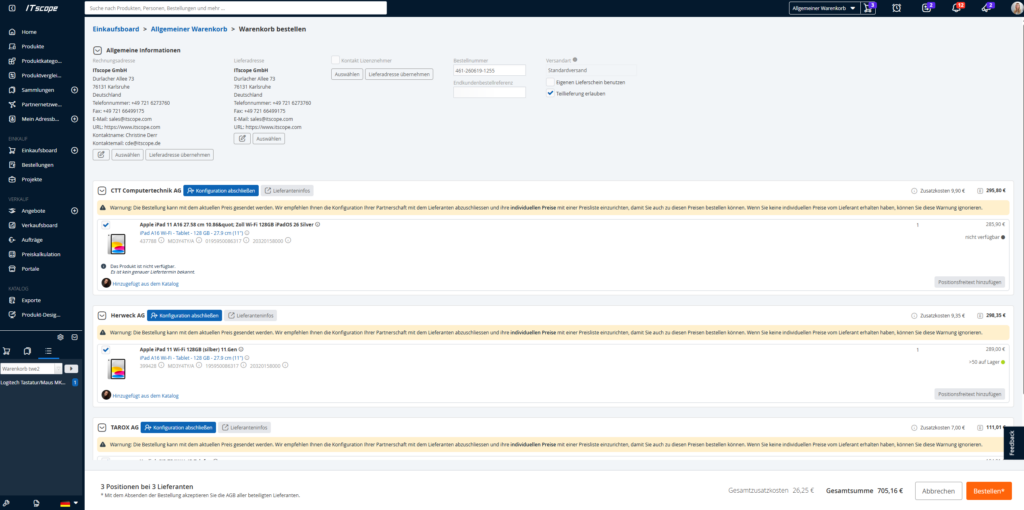
Key Features in the Checkout
Complete Configuration
If a supplier account has not yet been fully configured, click “Complete Configuration” to:
- Add your customer number
- Set up a price list to order under your individual purchasing conditions
Supplier Information
Click “Supplier Information” to view important supplier details, including:
- Delivery terms and conditions
- RMA information
- Terms & Conditions and Privacy Policy
- Contact details for the supplier representatives