
With project associations, you can now link projects from the ITscope platform directly to customers in your B2B Shop’s portal administration. This ensures that project-specific pricing and availability are automatically taken into account when calculating prices in your shop.
Key Benefits
- Assign one or multiple projects directly to a customer
- View customer–project associations at any time
- Quickly switch between portal administration and the project view
- Automatically apply project prices and project availability in your shop
- Calculate pricing rules based on the project’s purchase price
Assign a Project to a Customer
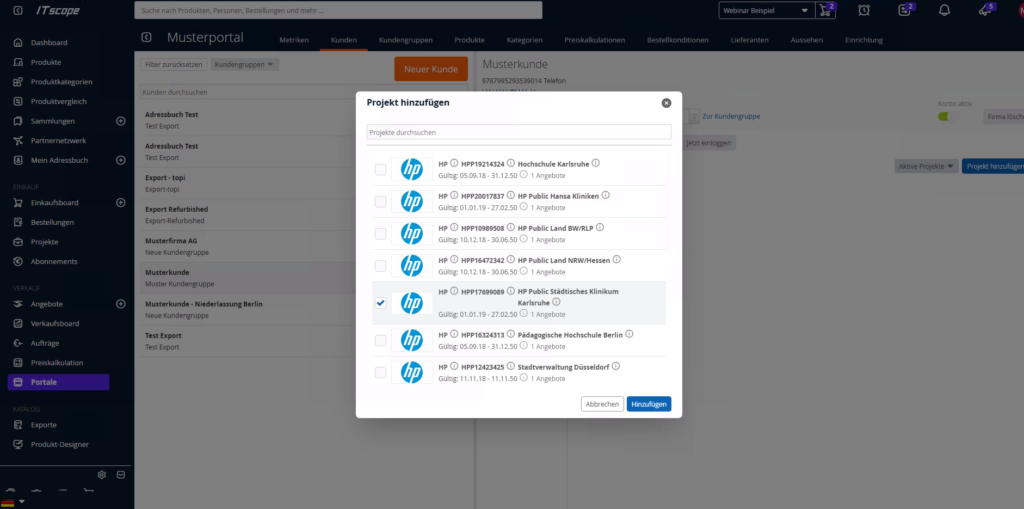
In the portal administration, you can select an existing project from the ITscope platform and link it to a customer.
Available Actions
- Add a project
- Remove a project
- Archive a project (for expired projects or when the project quantity has been fully allocated)
Note: You can update or remove a customer’s project association at any time.
View Customer–Project Associations
Once a project has been linked to a customer, the association is displayed in both the portal administration and the project itself.
This allows you to see at a glance:
- Which customer is linked to which project
- Whether a customer already has a project assigned
- Which project prices are being used for price calculations in the shop
Impact on Prices and Availability
When a project is linked to a customer, the B2B Shop automatically uses the following for all products included in the project:
- The purchase price stored in the project
- The availability stored in the project
This allows customer- and project-specific terms to be applied directly in your shop.
Price Calculation Using Pricing Rules
Existing pricing rules in your B2B Shop remain unchanged. However, calculations are now based on the project purchase price instead of the standard purchase price.
Example
The following pricing rule has been defined for the Mobile Phones product group:
Sales Price = Purchase Price + 10%
A project-specific purchase price has been defined for an iPhone 17 within the project.
The B2B Shop now:
- Uses the purchase price from the project
- Applies the configured 10% markup
- Displays the resulting sales price in the shop
This ensures that customers automatically receive the project-specific pricing that has been agreed upon, while preserving your configured margin.
Requirements
To use project prices in your B2B Shop, the following conditions must be met:
- The project must exist on the ITscope platform. For more information, see the Projects guide.
- The project must be linked to the appropriate customer.
- The relevant products must be included in the project.
Only then will project prices and project availability be used when determining prices in the shop.
Impact on Export
Project prices can also be included in the B2B Shop export, provided that the projects exist in the ITscope platform and are linked to the corresponding customer in the shop.